
The Alchemist scratch card
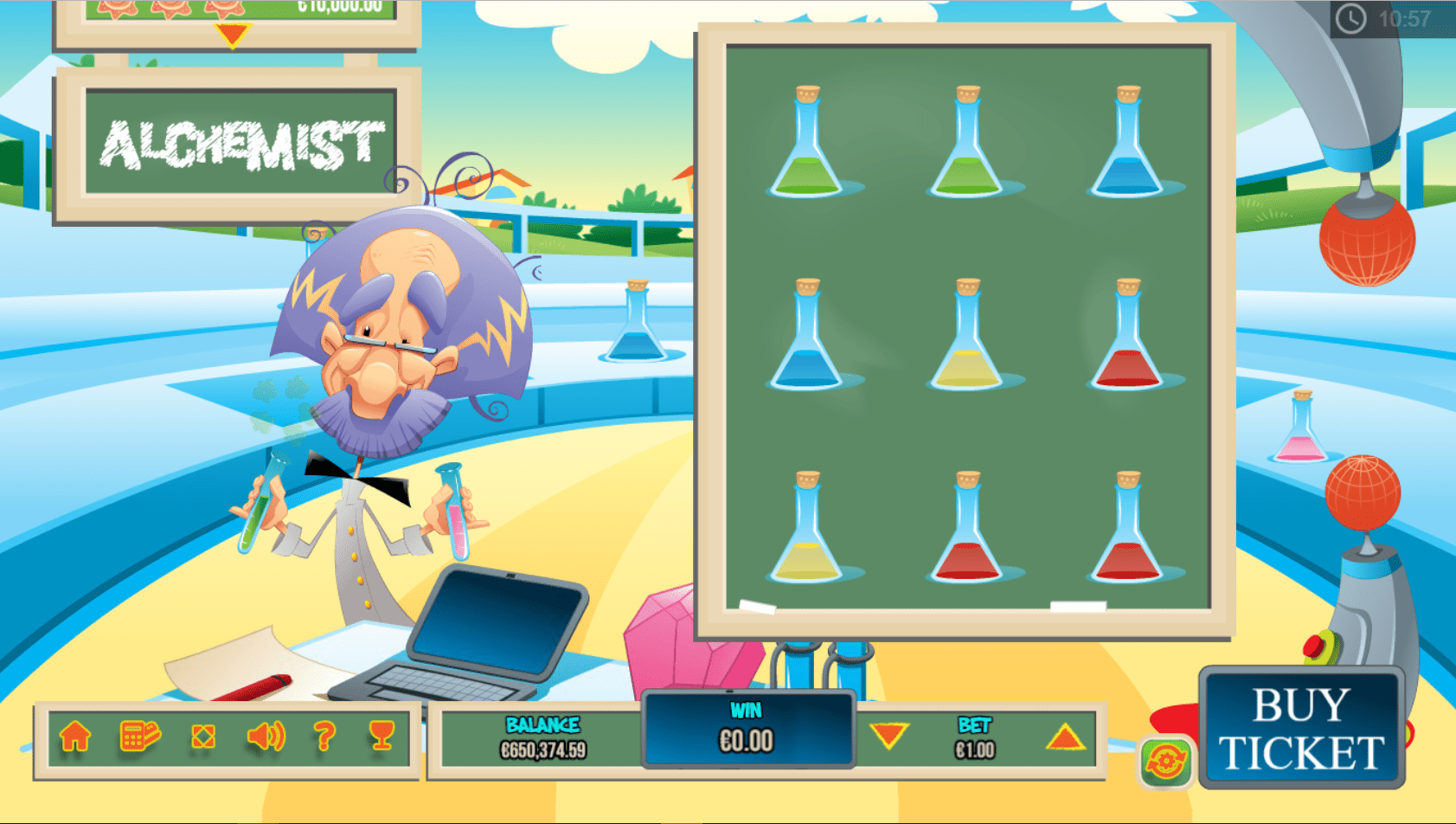
The Alchemist Game Help Version 1.0
Play this online casino scratch card See the best online casinos for USA
Game Overview
Game Description
Step into the laboratory of the Mad Scientist and mix up a winning formula in this fun and entertaining instant win game. As each flask reveals its contents, you simply need three matching symbols to win, but be careful, failing to reveal 3 matching symbols results in the experiment blowing up in the nutty professor’s face. The Alchemist offers a fantastic 100,000 jackpot which even the most scientifically challenged will want to WIN. So, put on your lab coat, open your PC or smartphone and come put your chemistry skills to the test.
Game Information
Game Paytable:
| Symbol | Multiplier |
| “No win” | X0 |
| X1 | |
| X2 | |
| X4 | |
| X5 | |
| X10 | |
| X20 | |
| X50 | |
| X100 | |
| X200 | |
| X1000 | |
| X10000 |
General Information Table:
| Game Type |
Scratch Game |
| Number of Payouts | 11 |
|
Number of Columns & Rows |
3×3 |
| Return to Player | 89.5% |
| Hit Rate (Optional) | 3.15 |
| Default Denominations | By Vendor |
| Full Screen Support | Yes |
| Sound Control | Yes |
| Mobile Support | Yes |
Playing the Game
Regular Mode / Ecommerce Mode
In regular mode, you will need to ensure you have funds/credits in your account.
To play in ecommerce mode , you will first need to purchase tickets for the game from the game host’s website. When playing in ecommerce mode and all your tickets are finished, a popup message will appear with the option to buy addtional tickets. Simply click on the offer and you will be redirected to the purchase area.
Game Play
To start playing, click/tap the “BUY TICKET”/ “PLAY”button on the lower right corner of the game area.
Now it’s time to reveal what is under the hidden/scratch areas by either using the mouse pointer on desktop or your finger on mobile devices.
Another way to uncover the hidden areas is to select the “REVEAL ALL” button. This option will reveal all the scratch/hidden areas at once.
In the case that you have three identical symbols, you will win the prize that corresponds to that symbol as per the paytable. You can access the paytable by clicking the trophy icon
If you do not have 3 matching symbols, you do not win and can try again by selecting the “BUY TICKET / PLAY NEXT” button again.
Payout Rules
- Winning combinations and payouts are calculated according to the game “PAYTABLE”. You can access the paytable by clicking / tapping the trophy symbol
- In case the game does not contain an in game paytable, the relevant paytable matrix can be found in this help file.
- The prizes are calculated using the following formula:
Bet X Multiplier = Win Amount.
Game Controls
Game Buttons
| Buy Ticket | Starts the round | |
| Play | Starts the round in ecommerce mode | |
| Reveal all
|
Reveals all the scratch / hidden areas at once | |
| Tickets left
|
Indicates the amount of tickets remaining in ecommerce mode | |
| Autobet / Autoplay
|
Opens the autobet / autoplay configuration | |
| Bet +/- | Increases or decreases the bet amount | |
| Win | Displays the current win amount and currency | |
| Balance | Displays the player’s current balance | |
| Volume Control (desktop only) | Enables or mutes the sound | |
| Toggle Screen Size (desktop only) | Opens and closes the game to full screen | |
| Home (optional) | Directs the player to the website’s home URL | |
| Cashier (optional, desktop only) | Directs the player to the cashier or the ‘My Account’ page | |
| Help | Opens the help page. (On mobile, this button can be accessed by clicking on the settings button) | |
| Settings (desktop only) | Opens the additional configuration screen | |
| Info | Opens the info and paytable screens. On mobile, this button can be accessed by clicking on the settings button |
Autobet \ Autoplay
Enables playing the game automatically for a predetermined number of rounds at the current bet configuration.
How to use the autobet \ autoplay feature – Desktop
To open the autobet \ autoplay, click on the icon next to the “Buy Ticket” button.
To set the autobet \ autoplay number of rounds, click on Change Autobet Rounds and choose your desired number of rounds from the list. To close the list, click on AUTOBETS above the number of rounds list.
To set the autobet \ autoplay limits, click on the ‘Plus’ sign on the upper right corner to reveal the autobet options. To minimize the options, click on the ‘Minus’ sign on the upper right corner.
To start the autobet \ autoplay, click the play button on the bottom left corner. Once clicked, the play button will change to a pause button that will allow you to pause the autobet whenever you choose. You can only pause in between rounds/spins and not while the round is in play. To close the autobet, click on the X sign on the upper right corner. During autobet play, the settings panel is closed.
How to use the autobet \ autoplay feature – Mobile
To access Autobet while playing from a mobile device, click on the autobet icon above the ‘Buy Tciket’ button or click on the settings button on the bottom right corner and then on the autobet tab.
To activate a limit, you will need to click on the relevant checkbox and enter a numeric value on the right side (in the case of ‘Single Win’, Win Limit’ and Loss ‘Limit’) and click on the ‘START’ button on the bottom left corner.
To exit the autobet \ autoplay screen without starting the autobet rounds, you will need to click the ‘RETURN’ button on the bottom right corner.
After clicking on the ‘START’ button, the game will return to the main screen and the ‘SPIN’ button will show the autobet rounds counter.
To stop the autobet \ autoplay, you will need to click on the autobet button again. Pausing the autobet is not possible in mobile mode.
Autobet \ Autoplay Limits
- Loss Limit – Allows you to control your combined losses by entering a numeric value that will stop the autobet function and trigger a popup message when the loss limit is reached. Calculated as follows:
(Sum of bets) – (Sum of wins) >= (Loss Limit amount). - Single Win – Will stop the autobet function and a popup message will be displayed when a single win payout is >= the ‘Single Win’ value entered.
- Win Limit – Allows you to control your combined wins by entering a numeric value that will stop the autobet function and trigger a popup message when the win limit is reached. Calculated as follows:
(Sum of bets) – (Sum of wins) >= (Win Limit amount). - On a Win – The autobet will stop and a popup message will appear on any win within a single round. A free spins feature is considered as one round for this limit setting and the autobet will only stop after all the free spins are finished.
When the limit’s conditions are met, the autobet will stop and the relevant popup message will appear in the middle of the screen and fade out after 5 seconds. The messages for the limits will appear as follows:
- Loss limit – “Loss limit reached”
- Win Limit – “Win limit reached”
- Single Win – “Single win reached”
- On a Win – “Win reached”
Autobet \ Autoplay Rules in the UK
Players from the UK (under the UKGC regulation) that want to use the autobet \ autoplay function, have to first set a loss limit and the number of rounds.
Any attempt without these two limits set, will result in these fields being highlighted in red until set. In addition to these regulatory requirements, the maximum number of autobet \ autoplay rounds is 25.
Mobile Settings Screen
The mobile game settings screen can be accessed by selecting the ‘Settings’ button on the bottom right corner. Entering the settings options will allow you to control various aspects of the game:
- Sounds – Control the ‘Ambient Sounds’ and ‘Sound Effects’. They can be switched on\off by selecting the appropriate checkboxes. By default the all sounds are switched on.
- Game Play – Toggle the ‘Full Screen’ on\off. You can also adjust the ‘Quality’ on\off. (The quality option exists only in specific games)
Reality Check
The reality check control alerts you as to how much time you have spent playing the game. The time interval can set by visiting ‘My Account’ through the host casino’s website.
*The reality check is mandatory under the UKGC regulation.
The popup message displays the amount of accumulated time spent in the game, from the moment the game is launched until the popup appears.
The alert message will popup in the middle of the screen based on the defined time interval and will stay on the screen until you choose one of three actions:
- Continue – You will return to the game being played.
- Go to Account – You will be redirected to your user account on the host website. In desktop mode, your account will open in a new window\tab. On mobile, the game screen will change to your account and will exit the game.
- Quit Game – This will exit the game and return you to the games lobby.
Relevant news
Alaxe in Zombieland
About Alaxe in Zombieland slot Microgaming Alaxe in Zombieland is a five reel, twenty-five payline,…
Fruit Shop slots
Fruit Shop™ has captured the classic feel and flow of the original fruit slots style…
Thunderstruck I & Thunderstruck II slot
Thunderstruck I About Thunderstruck I Thunderstruck I is a five reel, nine payline, and forty-five…
King Kong Scratch
King Kong Scratch The object of King Kong Scratch is to match the Prize symbol…
Hot as Hades slot
Hot as Hades slot Microgaming Hot as Hades Game Payouts Game Rules Wild, Multiplier Symbol…
Fruit Basket scratch card online
Fruit Basket Game Help version 1.2 Play this online casino scratch card at See the…